How a project works
From a pin on the map to a signed proposal, step by step.
Reviewed
What this is for
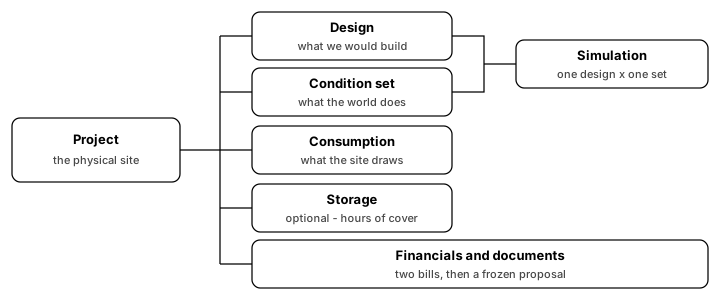
A project is one physical site. Everything else hangs off it. The strip across the top of the workspace is that path, in order: draw it, wire it, say what the world does and what the site draws, run it, cover the outages, price it, check it, then hand over a document.
The short path to a first production number is Your first project. This article is the shape, so you know why the strip is in that order.
Steps
Open a project. The strip is the walk.
- Overview is the site: name, pin, optional grid connection. Connection is asked once. Compliance, storage and financials all read it. Skip it if you do not have the bill in front of you.
- Designer is what you would build. Trace field segments, place keepouts, lay modules. A project can hold several designs. Duplicate one to compare options; lock the one you are quoting.
- Electrical is the wiring that came out of the designer: wire schedule, bill of materials, strings, single-line diagram.
- Conditions is what the world does to the array: weather, soiling, losses. No geometry lives here. Fetch a year or upload a file, then Apply.
- Consumption is what the site draws. It is not a condition set. The engine is generation-only and never sees load. Storage and financials both choose a profile; neither edits one here.
- Results is the matrix: designs down the side, condition sets across, one cell per pairing. A run happens in the background. A cell that is not ready says why - no modules, no weather - rather than showing
0. - Storage is optional, and it sits before financials on purpose. It dispatches a solved year against a load and an interruption schedule. Without a bank, an outage takes a grid-tied array with it. If the model is missing or pointed at another run, the bill is priced solar-only.
- Financials pairs a simulation with a tariff and a consumption profile. Both come from the site, not from this screen. Save keeps the inputs; Save and compute runs the engines. The saving is two bills: consumption alone, and consumption net of generation.
- Compliance is every grid-code rule against this design, passes included, and the connection applications filed from it.
- Documents generates a proposal from a template, a simulation and a financial model, and freezes the layout, the values and the branding. Regenerating makes another document. Added files (a survey, a warranty) live on the same screen. Share, on every section of the project, hands a client a view-only link that needs no account.
Tips and common mistakes
- A design carries no weather and a condition set carries no geometry. That split is Design vs condition set.
- Consumption is not weather. Two sites with the same annual kilowatt-hours and different evening peaks get different bills and different batteries.
- Storage before financials is a data dependency, not a preference. Price it first and the cash flow never sees the battery.
- Empty yield and shading are a dash, not
0. Capacity of0 kWpmeans nothing has been laid out yet. - Grid connection, a weather year, and a consumption profile are each optional until a later screen needs them. Financials with no tariff says so and will not compute.