Wiring zones
Group segments, pick an inverter, and size strings.
Reviewed
What this is for
Which modules share an inverter, and how long a string of them may be. A field segment belongs to exactly one zone. A segment in none produces no strings, and the array on the canvas is then larger than the system that will actually generate. Those leftovers are listed here rather than dropped in silence.
The outputs (wire schedule, bill of materials, single-line diagram) are their own page. This rail is the decision; that page is the drawing.
Steps
- Open the designer, then Electrical on the rail. Wiring zones counts the zones. A dash here means the design has not loaded yet, not that there are none.
- Add a wiring zone if you need another. A new zone starts empty, with no inverter and
0.00 kWp.
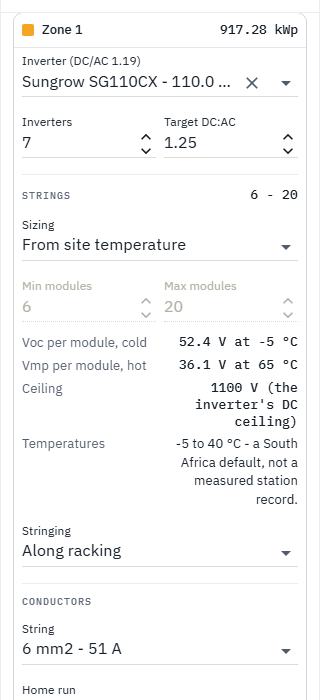
- Choose an inverter. Type a make or model; the list is a search, not the whole catalogue. The achieved DC:AC sits on that control and moves as soon as the count does, before anybody presses Generate wiring. Target DC:AC is a wish; inverter count rounds to nearest. Type an Inverters count yourself and it stops following the target until you press Derive the count from the target again. A battery inverter with no PV input is marked as one in the list and warned about the moment you pick it: its system voltage is a battery bus ceiling, so strings sized against it are the wrong length. It still wires, but the design will not lock with it.
- Move a segment in. Order is data: modules are gathered into strings in the order the segments are listed. Not in a zone is the list of what will produce nothing.
- Strings: From site temperature solves min and max from the module and the inverter at this site's cold and hot cells. The cold cell is the cold air (first light, Voc); the hot cell is not (mid-afternoon, Vmp). Manual lets you type the range; Use the temperature range puts the solved pair back. A pairing that cannot be sized says so here, rather than blanking the block. Choosing From site temperature on a zone with nothing in it yet is kept: the range is solved once the zone has an inverter and a field segment.
- Generate wiring stays disabled until a zone can be wired (inverter chosen, something in it). Changing a zone parameter after that drops the stored layout; it does not regenerate. That is the next article.
Tips and common mistakes
- Do not leave the array in Not in a zone and wonder why the matrix will not simulate: with no strings there is nothing to run, and with some there is only the part that is wired. On the canvas a segment in no zone keeps its plain outline while zoned segments take their zone's colour. The ringed modules after Generate are a different problem - leftovers inside a zone.
- Sizing the hot end against air temperature is the classic error. The pane names both cell temperatures when a range has been solved.
- The clear button on the inverter box unassigns the machine and drops the wiring. Emptying the text to search does not: leave the box empty and the chosen name comes back.
- Zero combiner poles means the strings land on the inverter directly. That is a choice, not a missing field.