Generate wiring
What generate produces, and how issues are reported without blocking.
Reviewed
What this is for
One explicit action that strings the modules, places combiners and inverters in the model, and writes the schedule. Editing a zone after that drops the stored layout rather than regenerating it. Regenerating behind every keystroke would put a three-hundred-string solve behind every field.
Nothing in the generator refuses. Over-current trackers, over-ampacity conductors, excessive drops and missing optimizers are reported with a named issue and still wired. A check that cannot be saved is blocked before you get here. Requiring an optimizer blocks locking, not generation - so you can see what the design would be.
Steps
- Open the designer, Electrical. Choose an inverter, put at least one field segment in the zone. Generate wiring stays disabled until a zone can be wired.
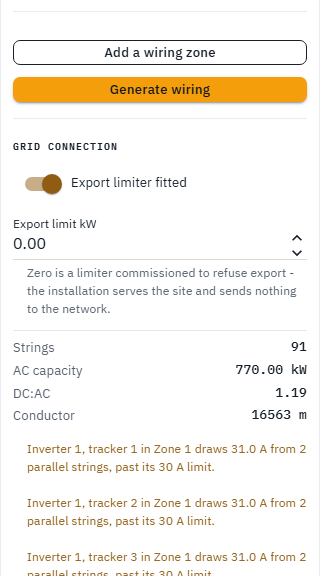
- Press Generate wiring. The pane then shows strings, AC capacity, DC:AC and conductor metres, and Wire schedule, bill of materials and diagram appears at the top of the pane. Changing a zone parameter after that drops the stored layout; it does not regenerate. The pane warns you when an edit has dropped a schedule you had. Press Generate again.
- Issues sit under the summary. They are warnings, not a stop. Orphan modules (the remainder that will not fill a whole string) are ringed on the canvas and counted in a warning above the zone list, never dropped in silence. Shorten strings to fit or Remove them are the two ways out.
- Placing or moving hardware on the canvas - an inverter, a combiner, the grid connection point, a board or the bank - regenerates the wiring on the spot, because every length measures to where it stands. Fitting a battery drops the stored layout, because a bank is hardware on the design even though it moves no module.
- The outputs page carries the same button (Generate wiring, or Regenerate wiring once a schedule exists) and runs it against the zones already configured. Which inverter serves which zone is still this rail's job.
Tips and common mistakes
- Do not expect the schedule to update as you type. Apply the zone, then Generate.
- A check that did not run is reported. An inverter stating no maximum DC input is not a silently skipped loading test.
- Generate on a locked design is refused, not only greyed on the button.