Weather
Fetch weather for the site grid cell or upload a TMY or EPW file.
Reviewed
What this is for
The typical year the engine runs against: 8,760 hours of irradiance, temperature and wind. Without a file, this condition set cannot be simulated. Fetching is the default for a new site; upload is for a year you already hold.
The year is local standard time, with no daylight saving. Solar geometry is sampled at the hour midpoint. Whether a source is hour-ending or hour-beginning is recorded and stated on every export; it is never quietly rewritten.
A site's typical year is prefetched in the background when the project is pinned. If that has not arrived, Fetch for this site does the same job. A failed fetch does not invent a year. Upload a TMY or EPW you already have, or wait and fetch again.
Steps
- Open Conditions. Open the set you want (a new project starts with one). Press Weather on that set's tab row - the same row as Losses, Models, Mismatch, Advanced and Components.
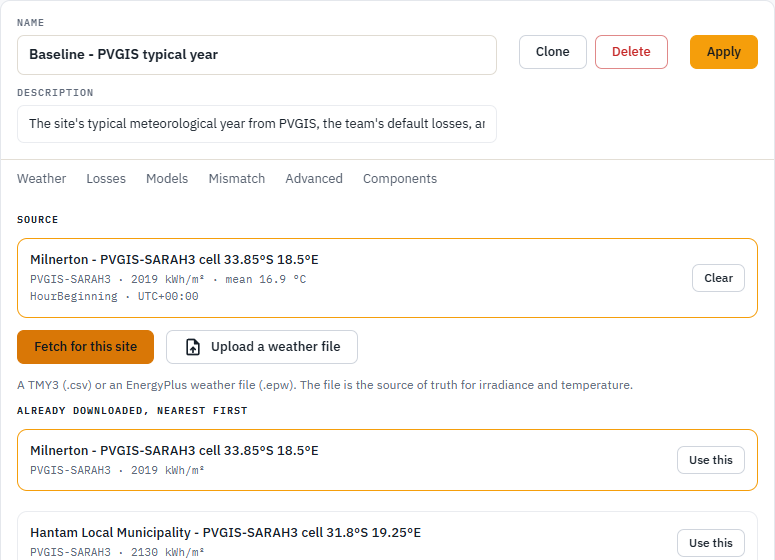
- Fetch for this site asks the irradiance service for this site's grid cell. Coordinates are snapped to a grid so an exact pin is not stored where every team can read it. The service is free and public, and at busy times a year can take the better part of a minute to arrive: the page says how long it will wait while it waits, and stops the request if you leave. A cell this deployment has already downloaded is answered from the stored copy without asking the service at all, so a site near earlier work is instant whatever the service is doing.
- Already downloaded, nearest first lists years this deployment already holds. Use this picks one without asking the service, which is the way round a slow afternoon when this site's own cell has never been fetched. Distance is why a neighbouring cell is offered: it is not this roof's pin.
- Upload a weather file is a TMY3 (
.csv) or EPW you already have. A short year is refused. A leap day is dropped - the simulation year is 8,760 by definition. Diffuse cannot exceed global; that is the check that catches a transposed column pair, and the import notices say how many hours it had to cap. - Whichever of the three you use, the source reads not applied yet until you press Apply. Leave the page before that and the set still has its old year, or none.
- Solar angles computed for is the project's own pin unless you choose the weather file's location. They differ when the year comes from a station some distance away: the irradiance belongs to the station and the array belongs to the project, so the set records which one the sun was placed over.
- Once a file is on the set, the strip reports annual global-horizontal irradiation as the file holds it, plus the other figures read out of that year.
A typical meteorological year is one synthesised year. It has no inter-annual spread in it. P90 is not a second weather file; that is P50, P90, and uncertainty.
Tips and common mistakes
- Prefer the cell this site sits in over a famous nearby city. The list is nearest first for a reason.
- A decimal comma in a comma-separated file splits one value into two and shifts every column after it, so the upload is refused and the message names the line. Re-export the file with decimal points rather than editing columns by hand.
- Do not retry a fetch that just failed into a rate limit. Wait, then press once.