Run the results matrix
Pair each design with each condition set and queue a simulation.
Reviewed
What this is for
Every pairing of a design and a condition set. Designs down the side, condition sets across the top. Read across a row to compare one design under different assumptions; read down a column to compare designs under one. A flat list of runs expresses neither axis.
The engine does not run on the page. Simulate what needs it queues the pairings that are ready. Progress is reported; a finished cell holds the numbers.
Steps
- Open Results. The strip is how many designs, how many condition sets, and how many of those pairings have been run.
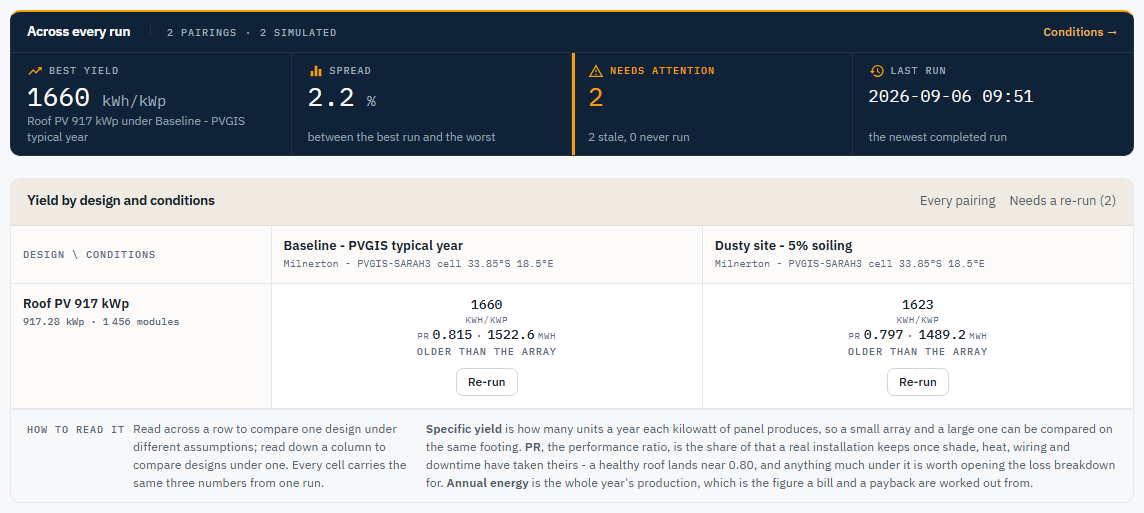
- Across every run states pairings, how many are simulated, best yield (a dash until something has been run), the spread between the best and worst run (drawn only once two runs exist), what needs attention (stale vs never run), last run.
- Each cell is one of: Not ready (with a reason), an offer to simulate, a progress bar with Cancel, a failed run with Try again (hover the mark for why), or the three numbers from a completed run. Specific yield is the headline (it compares arrays of different sizes). Performance ratio and annual energy sit under it, from the same run. There is no switcher: all three are already on the cell.
- A stale cell keeps its numbers and says what they are older than: the array, the wiring, the conditions or the engine. Re-run sits under that.
- Not ready to simulate lists why. Typical reasons: the design has no modules, a module or inverter is missing a datasheet figure the production model needs, the condition set has no weather, the wiring strung nothing, or a locked design's wiring predates its array. Missing or out-of-date wiring on an unlocked design is not a blocker: the cell's button carries a Rewires first note, and the run regenerates the wiring before it starts.
- Simulate what needs it queues every ready pairing that has not been run, is stale, or failed. It will not invent a weather year or an array. Needs a re-run, opposite the matrix title, hides the designs with nothing stale or unrun; it is only drawn while something needs one.
- Cancel stops a run at the next hour boundary and the cell goes back to an offer to simulate. A cancelled run stays cancelled: it does not finish in the background and fill the cell later.
- Open a finished cell for the report. That is a different article.
Run history, under the matrix and closed until you open it, lists every run on the project, marking the one each cell shows as In matrix and the rest as Earlier run. Every completed run is offered when you pick one for a financial model or a proposal, so a dozen re-runs of one pairing are a dozen near-identical choices. The delete button over the open list counts the superseded runs and clears the ones a newer run has replaced. A run a financial model, proposal or storage model is built on reads Kept and is never removed.
Tips and common mistakes
- A zero nameplate is not a failed run. Not ready is the pairing refusing, with a sentence.
- Best yield is a dash when nothing has been run, not
0. A zero would look like a year that produced nothing. - The matrix holds the newest run of each pairing. A financial model may point at an older run. Those are different lists, and Run history is where both are seen.
- A design larger than the team's plan allows, or any design on a team with no plan, is refused when you queue it, not while you draw it. The message names the ceiling. See Plan and usage.