Tilt, azimuth, and racking
Two tilts, true-north azimuth, and what racking changes.
Reviewed
What this is for
The plane the modules sit on, and the bearing they face. Two tilts about two axes, not one number. Getting this wrong invents self-shading on every pitched roof, or tells a reviewing engineer the array is flat.
Module tilt is measured from the plane the racking stands on, so modules lying flush on a pitched roof are 0. The roof's own pitch goes in Surface tilt, with the bearing it falls toward. The report states the composed plane, never the racking pitch against the roof.
Azimuth is 0° at true north, increasing clockwise. The default is toward the equator. A horizontal plane's azimuth is a dash on a report, because a bearing there changed no output.
Steps
- Open the field segment. Racking first.
- Flush mount and Carport: Module tilt sits at
0and is disabled. The roof's pitch goes in Surface tilt. - Fixed tilt and the rest: module tilt is the racking's own pitch off the surface it stands on.
- Add independent tilt brings up Surface tilt and Surface azimuth, which is where a pitched roof goes. Remove independent tilt stops composing a second plane.
- Single-axis tracker, East-West and Carport come with the plans that include them. On a plan without them, changing a segment to one is refused with a message naming the plan that includes it, and the segment is not updated; a segment already drawn that way stays editable.
- Flush mount and Carport: Module tilt sits at
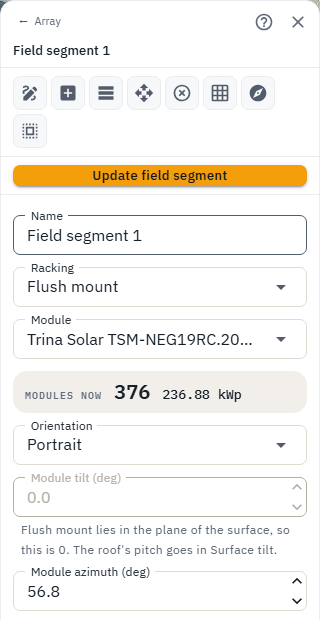
- Module azimuth and Surface azimuth are true-north bearings. Face in the per-edge list sets both from a roof edge, which is how an array is really set out. For a roof the outline does not describe, Draw the direction the modules face in the palette: select the segment, click the top of the slope, then downhill. An arrow drawn close to one of the segment's own edge facings holds to it and sets both azimuths exactly as that edge's Face does.
- Row spacing is the pitch. Rather than guessing, use the No-shading window solver: a date and a window, Solve, then Use this spacing - it solves the spacing that keeps the rows out of each other against this site's real sun angles, and nothing changes until you use it. Span / rise is disabled on flat racking. GCR is the ground-cover ratio that follows.
- Casts shade on other segments decides whether this segment's racking shades anything else, and whether its shadow is drawn on the plan at all. Row-on-row loss inside the segment is never this switch - it is row spacing, and it is always modelled. Switch this on with a shade window set and each row draws the shadow it throws on the row behind it, which is what that loss looks like.
- Update field segment writes. Arrow keys in a numeric field step by the field's own increment and save nothing until then.
Tips and common mistakes
- Do not put the roof pitch in module tilt on a flush array. That tilts the modules off the roof and shades the row behind.
- PVsyst uses 0 = equator-facing. Import and export convert. Do not "correct" a southern array to 180.
- Two tilts compose as rotations, not as a sum of degrees.