3D view
Orthographic scene for row gaps and clearance, not a second layout.
Reviewed
What this is for
Judging row-to-row shading and clearance by eye. It computes no geometry. It is the same layout lifted. Orthographic on purpose and to scale, so a row gap at the back measures the same as one at the front. Perspective would make the back rows look further apart than they are.
It is not a rail item. Plan / 3D sits on the canvas HUD.
Steps
- On the designer HUD, press 3D. Plan is the filled button until then.
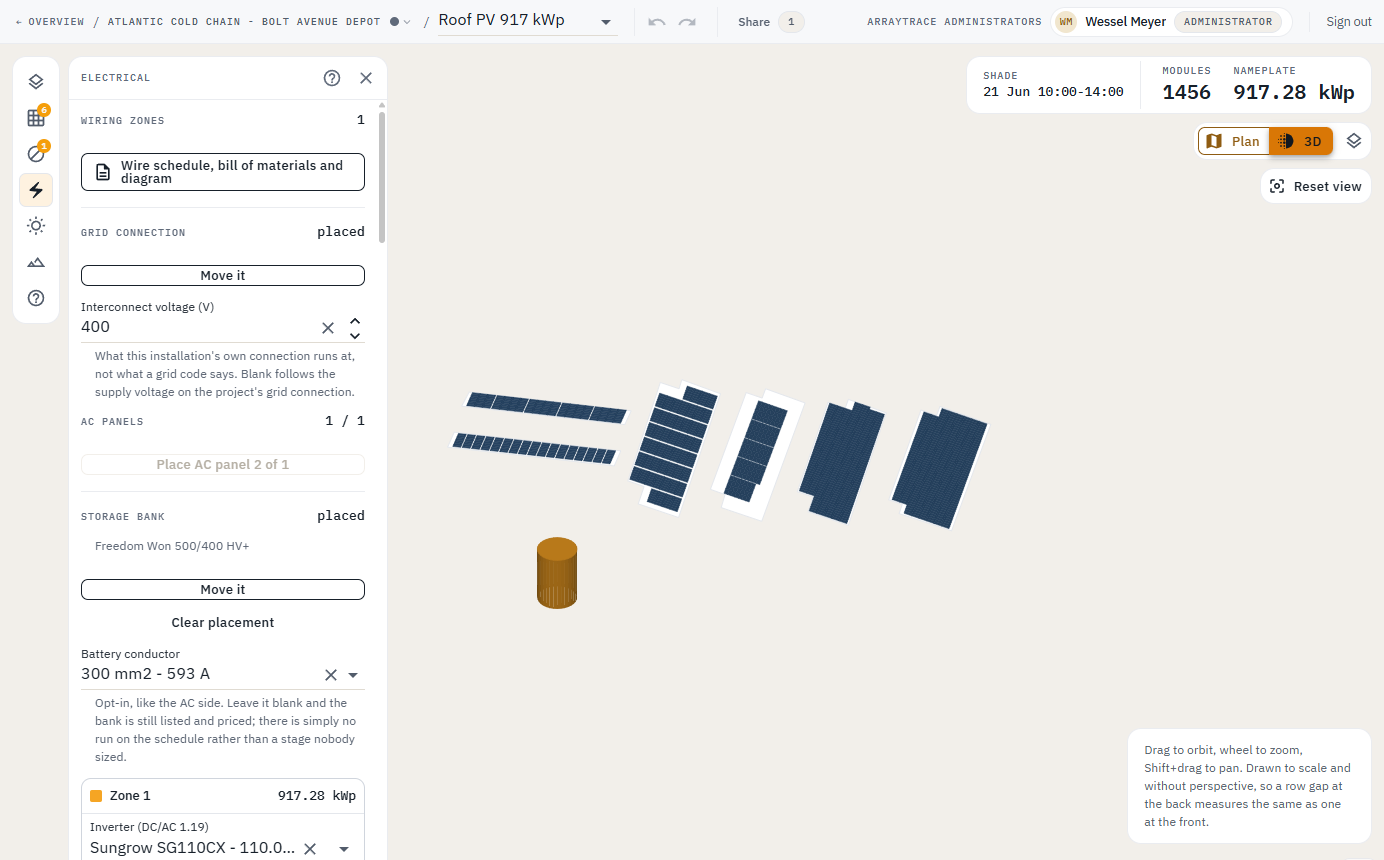
- Drag to orbit, wheel to zoom, Shift+drag to pan. Reset view recentres.
- Shift+drag on the plan opens the 3D view aimed by the drag.
- Surface height on the field segment is what puts one array above another in this view. Flush on the ground is
0 m. - Switch back to Plan to edit. The 3D scene is where the work is checked, not where it is done.
Tips and common mistakes
- Do not read depth into an orthographic view. The back row is not further away.
- A frame more than one module up is drawn as one table, each tier standing on the one below it from the front edge up. A 2-up bank is as tall here as it is when it shades the row behind, not two low tables side by side.
- A keepout's height is the extrusion between the base it stands on and its top. The shade drawn on the plan is cast from the same two, so the 3D view and the shadow cannot become a third opinion about how tall a thing is.